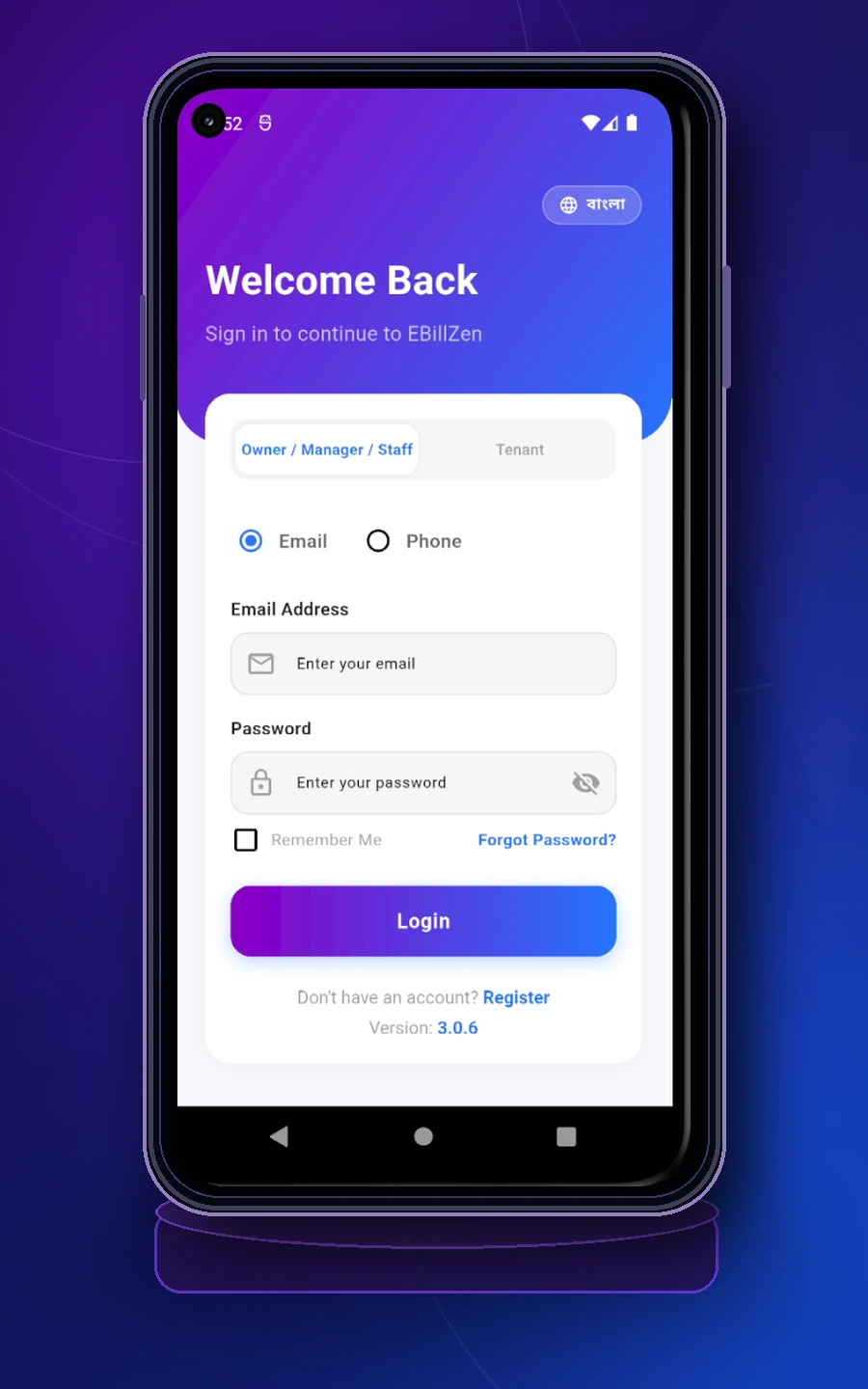
Welcome back screenWelcome back স্ক্রিন
Owner / Manager / Staff and Tenant access start from this screen.Owner / Manager / Staff এবং Tenant – দুই ধরনের প্রবেশপথ এই স্ক্রিন থেকেই শুরু হয়।
Follow 9 illustrated guides—from signing in and collecting bills to choosing the original electricity-meter workspace. ছবিসহ ৯টি সহজ নির্দেশনায় শিখুন কীভাবে বিল তৈরি, টাকা গ্রহণ ও হিসাব মেলাবেন। শুধু বিদ্যুৎ মিটারের পুরোনো ব্যবস্থাও চালু করতে পারবেন।
Start from the login screen. Homeowners, managers and staff can sign in with email or phone. Tenants can use their own dedicated access from the tenant side. লগইন স্ক্রিন থেকেই যাত্রা শুরু। বাড়িওয়ালা, ম্যানেজার বা স্টাফ ইমেইল অথবা ফোন দিয়ে সাইন ইন করতে পারবেন। ভাড়াটিয়ারাও তাদের নিজস্ব tenant access ব্যবহার করে প্রবেশ করতে পারবেন।
Owner / Manager / Staff and Tenant access start from this screen.Owner / Manager / Staff এবং Tenant – দুই ধরনের প্রবেশপথ এই স্ক্রিন থেকেই শুরু হয়।
After signing in as a homeowner, choose your property, set the billing month and manage flats, rooms or shops as separate units.বাড়িওয়ালা হিসেবে সাইন ইন করার পর আপনার প্রপার্টি নির্বাচন করুন, billing month ঠিক করুন এবং প্রতিটি ফ্ল্যাট, রুম বা দোকানকে আলাদা unit হিসেবে পরিচালনা করুন।
Use the home dashboard to switch property and billing month.Home dashboard থেকে property এবং billing month পরিবর্তন করুন।
Maintain all flats, rooms and shops under Unit Management.Unit Management থেকে সব ফ্ল্যাট, রুম ও দোকানের তালিকা রক্ষণাবেক্ষণ করুন।
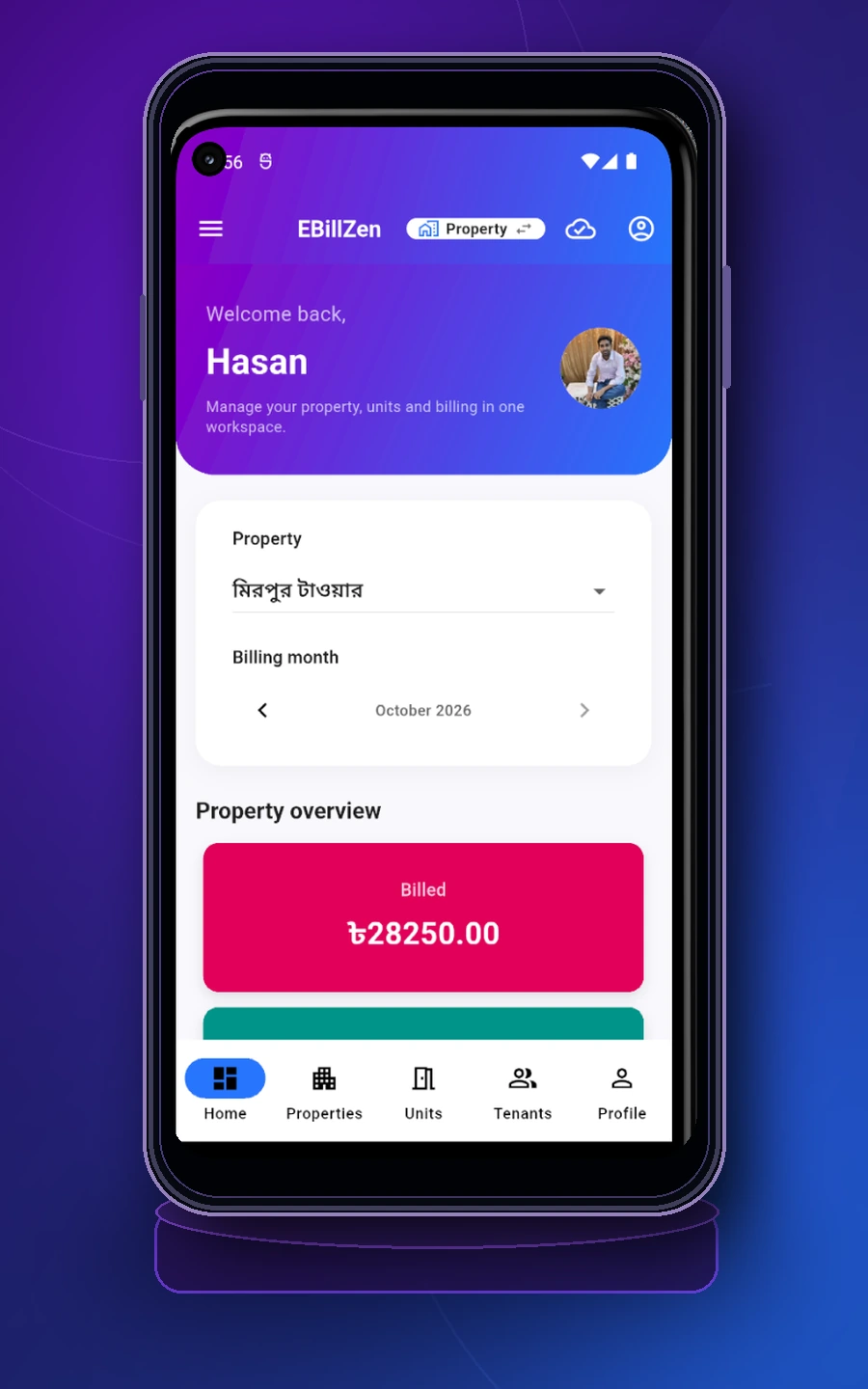
Select the active property and billing month from the home screen.Home screen থেকে active property এবং billing month নির্বাচন করুন।
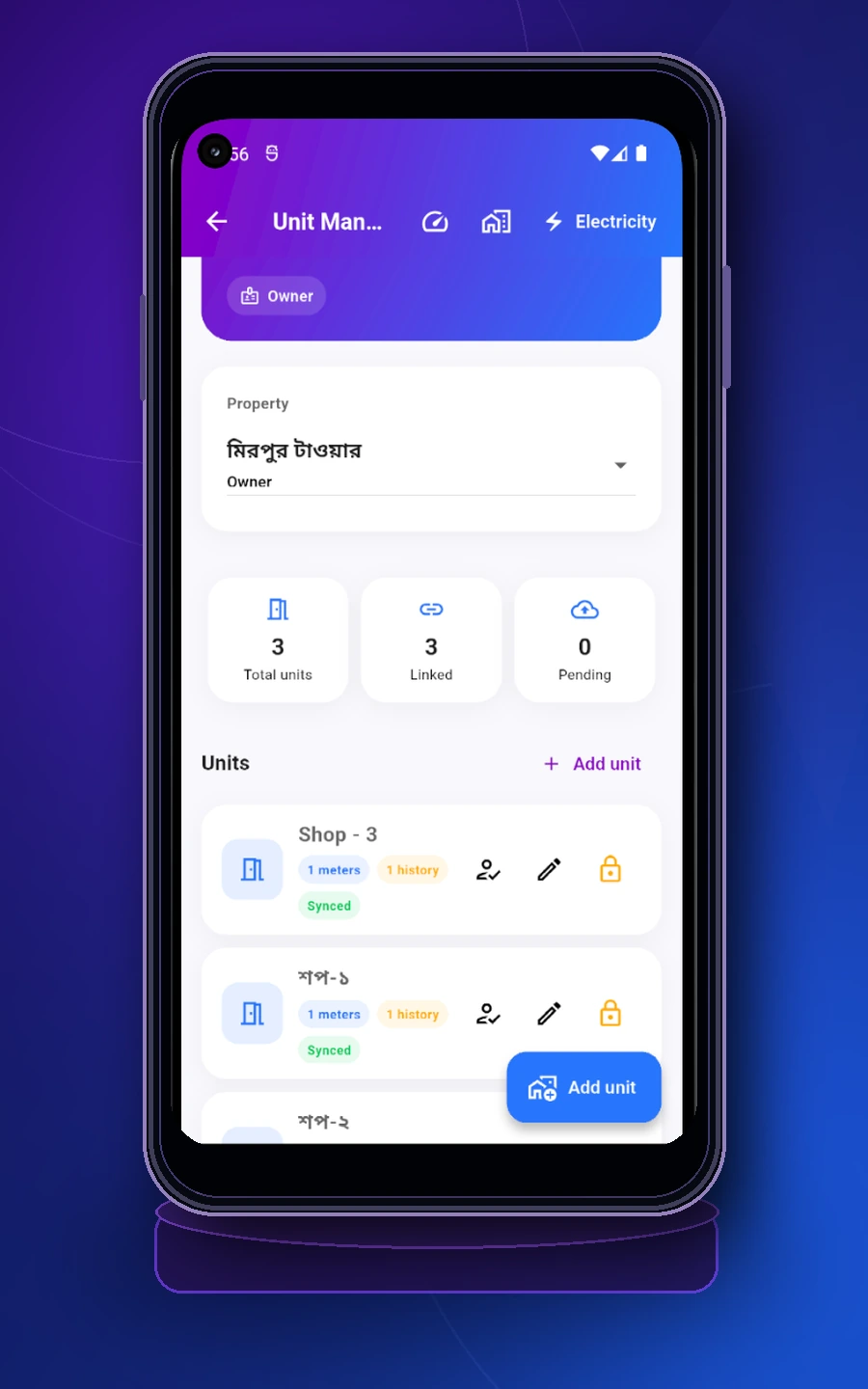
See total units, linked units and add a new unit when needed.এখানে total units, linked units দেখা যায় এবং নতুন unit যোগ করা যায়।
Create tenant profiles first, then use Tenancy Management to assign them to units. This is also where move-in and move-out status is maintained.প্রথমে tenant profile তৈরি করুন, এরপর Tenancy Management থেকে তাদের unit-এ assign করুন। এখান থেকেই move-in এবং move-out অবস্থা পরিচালিত হয়।
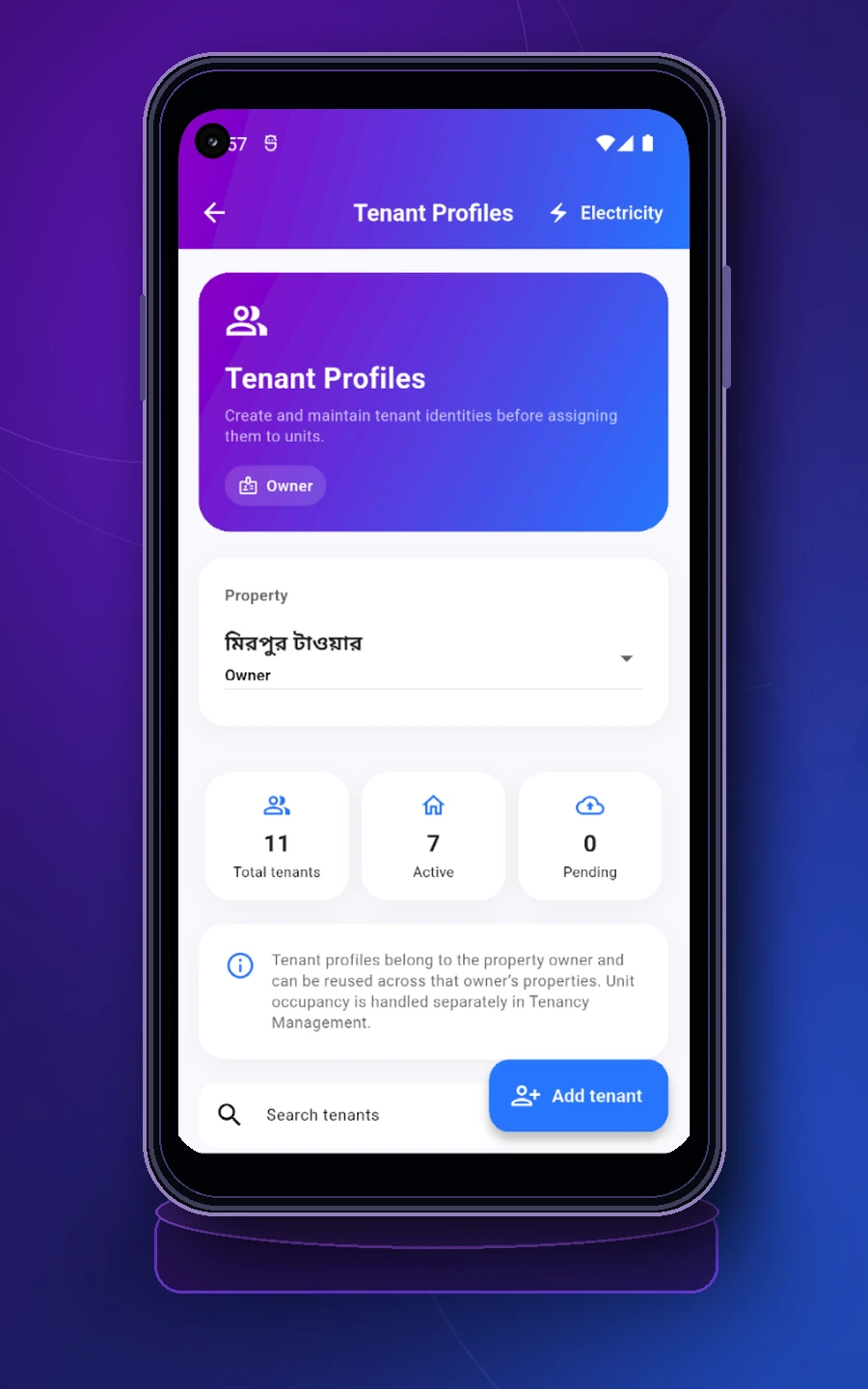
Create and search tenant records before assigning any unit.কোনো unit assign করার আগে tenant record তৈরি ও search করুন।
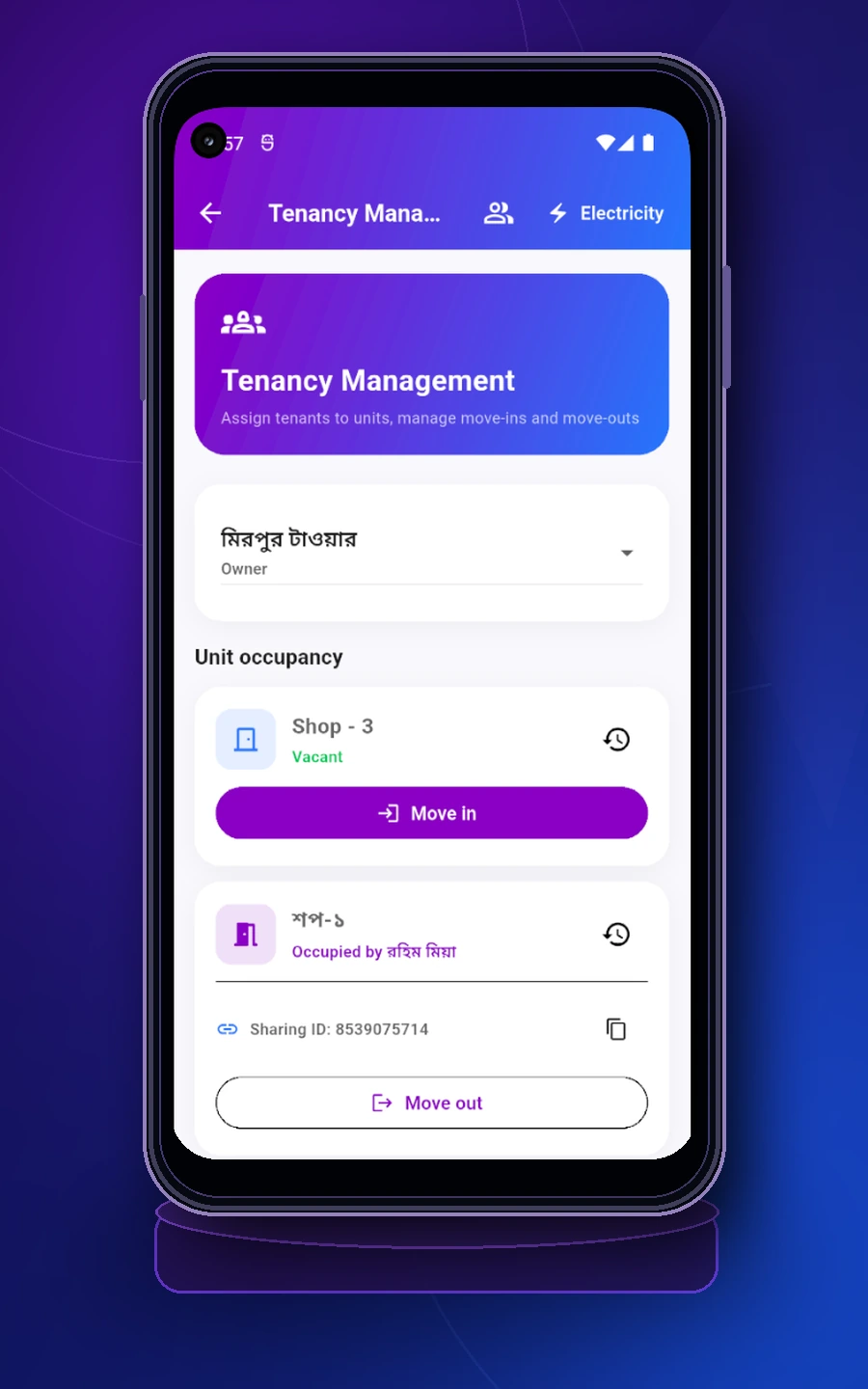
Assign tenants to vacant units and manage move-in or move-out clearly.খালি unit-এ tenant assign করুন এবং move-in বা move-out সহজে পরিচালনা করুন।
Set recurring tenancy charges first. Then go to Invoice Generation, review all tenancies for the month, enter required meter readings and generate one invoice per tenancy.প্রথমে recurring tenancy charges নির্ধারণ করুন। তারপর Invoice Generation-এ গিয়ে সেই মাসের সব tenancy পর্যালোচনা করুন, প্রয়োজনীয় meter reading দিন এবং প্রতি tenancy-এর জন্য একটি invoice তৈরি করুন।
Use Charge Management to define rent and other recurring charges.Charge Management থেকে rent এবং অন্যান্য recurring charge নির্ধারণ করুন।
Open the monthly invoice page, choose the tenancy and provide the latest meter reading if required.মাসিক invoice page থেকে tenancy নির্বাচন করুন এবং প্রয়োজন হলে সর্বশেষ meter reading দিন।
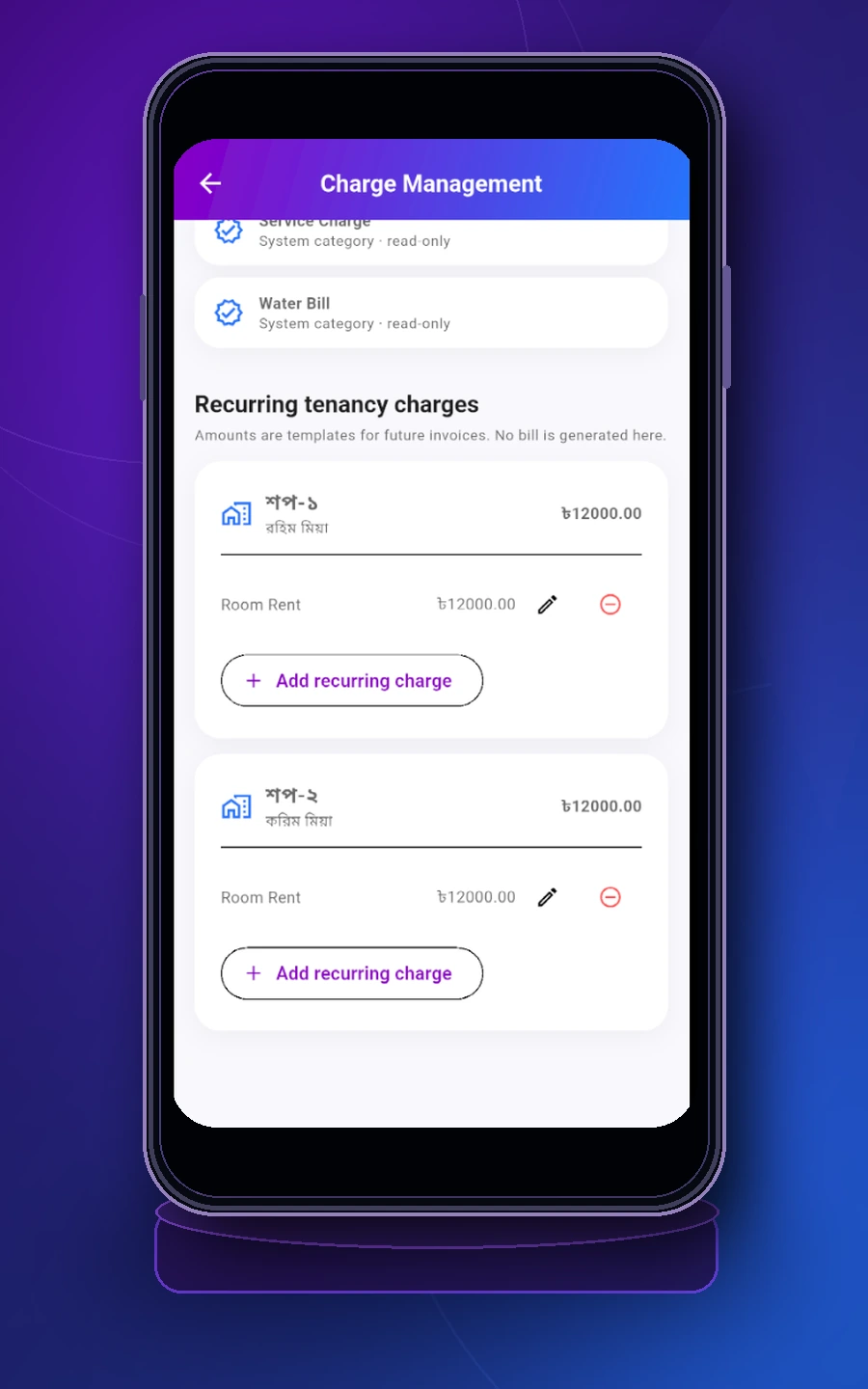
Maintain rent and other recurring items for each occupied unit.প্রতিটি occupied unit-এর rent ও অন্যান্য recurring charge নির্ধারণ করুন।
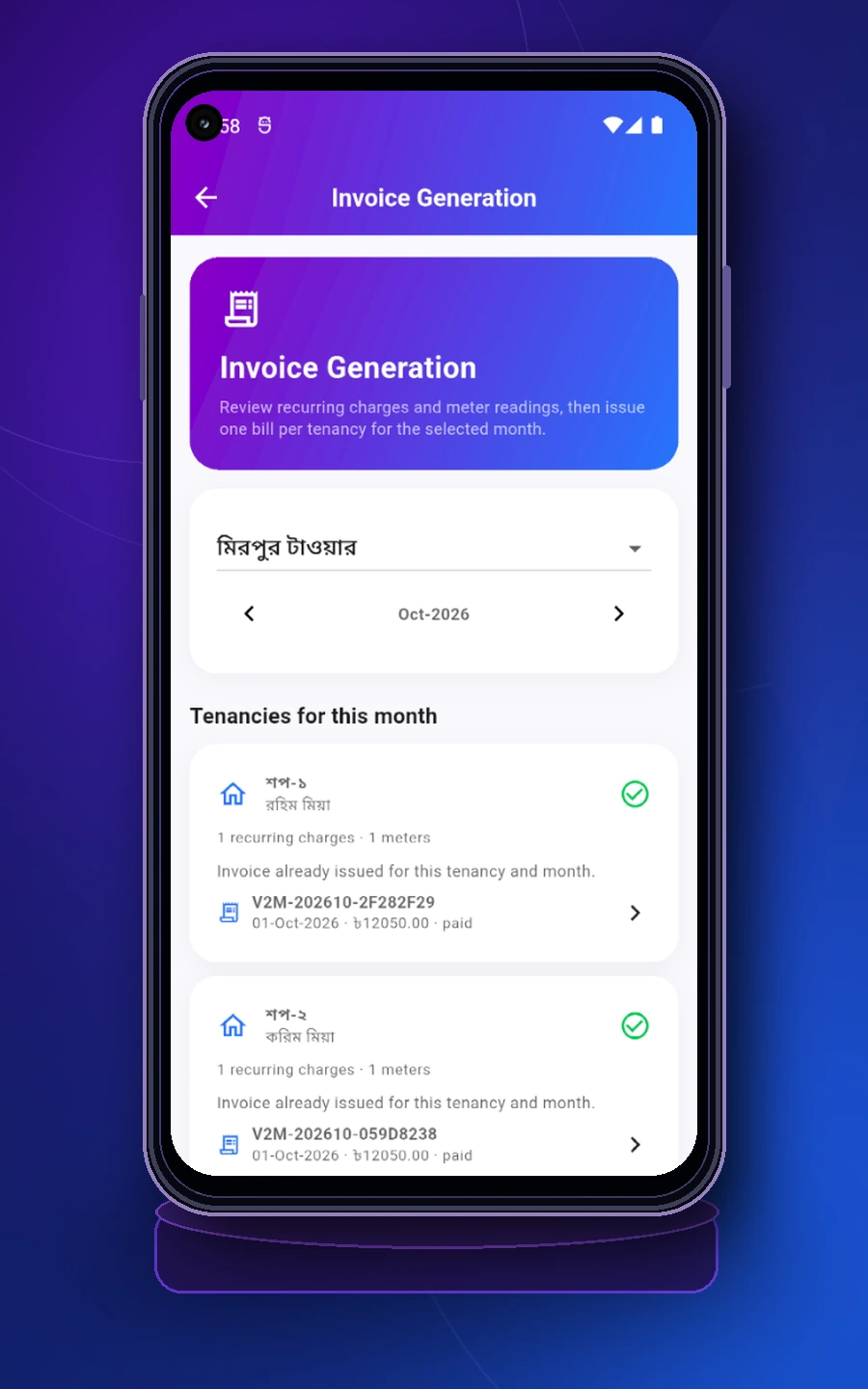
Review monthly invoice status for each tenancy before issuing a new bill.নতুন bill issue করার আগে প্রতিটি tenancy-এর monthly invoice status দেখে নিন।
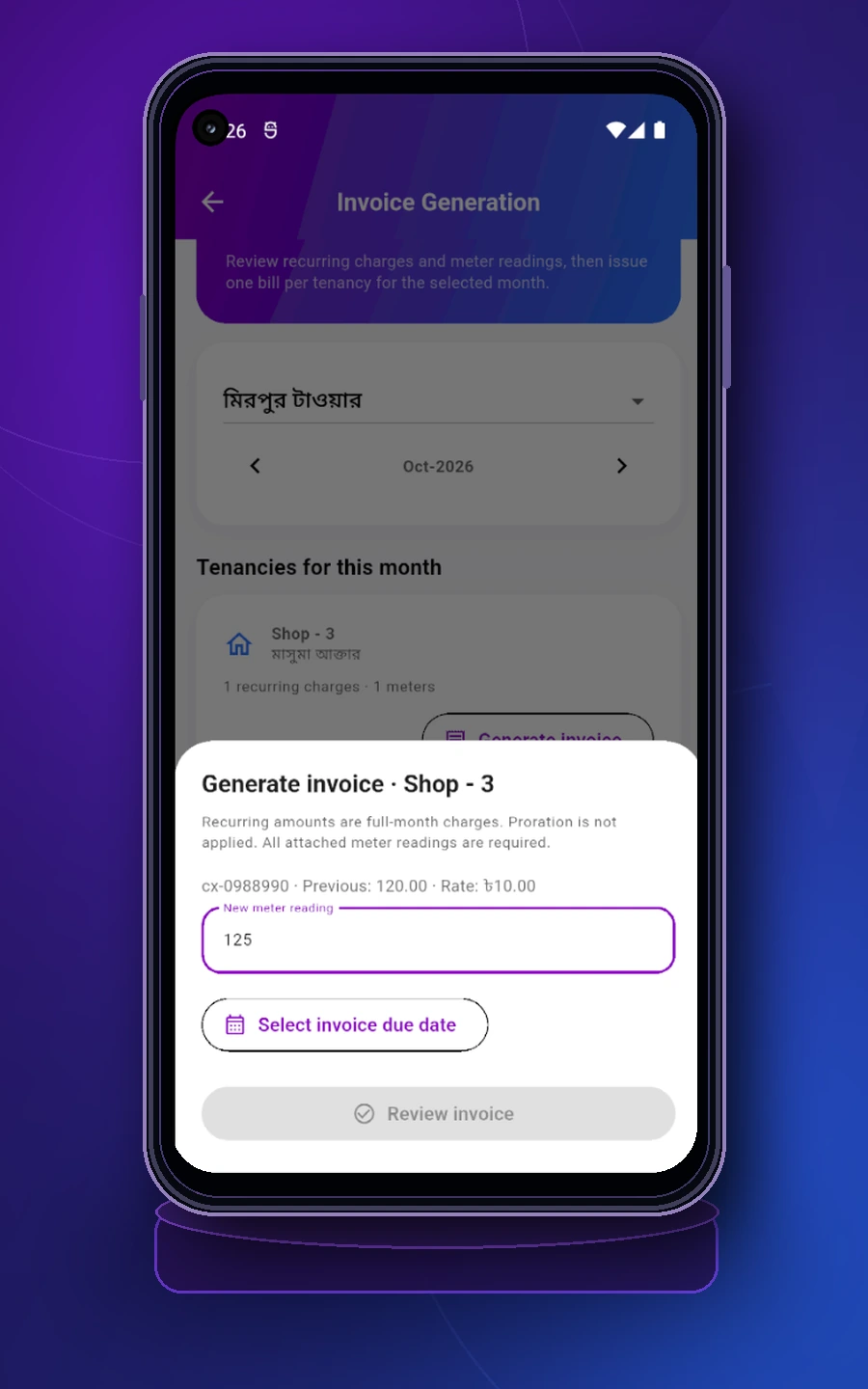
Enter the new meter reading and choose the invoice due date.নতুন meter reading দিন এবং invoice due date নির্বাচন করুন।
Use Payments & Allocations to receive full or partial payments. The payment screen clearly shows total retained amount, change to return and remaining due.Payments & Allocations থেকে পূর্ণ বা আংশিক পেমেন্ট গ্রহণ করুন। পেমেন্ট স্ক্রিনে retained amount, ফেরত টাকার পরিমাণ এবং remaining due পরিষ্কারভাবে দেখা যায়।
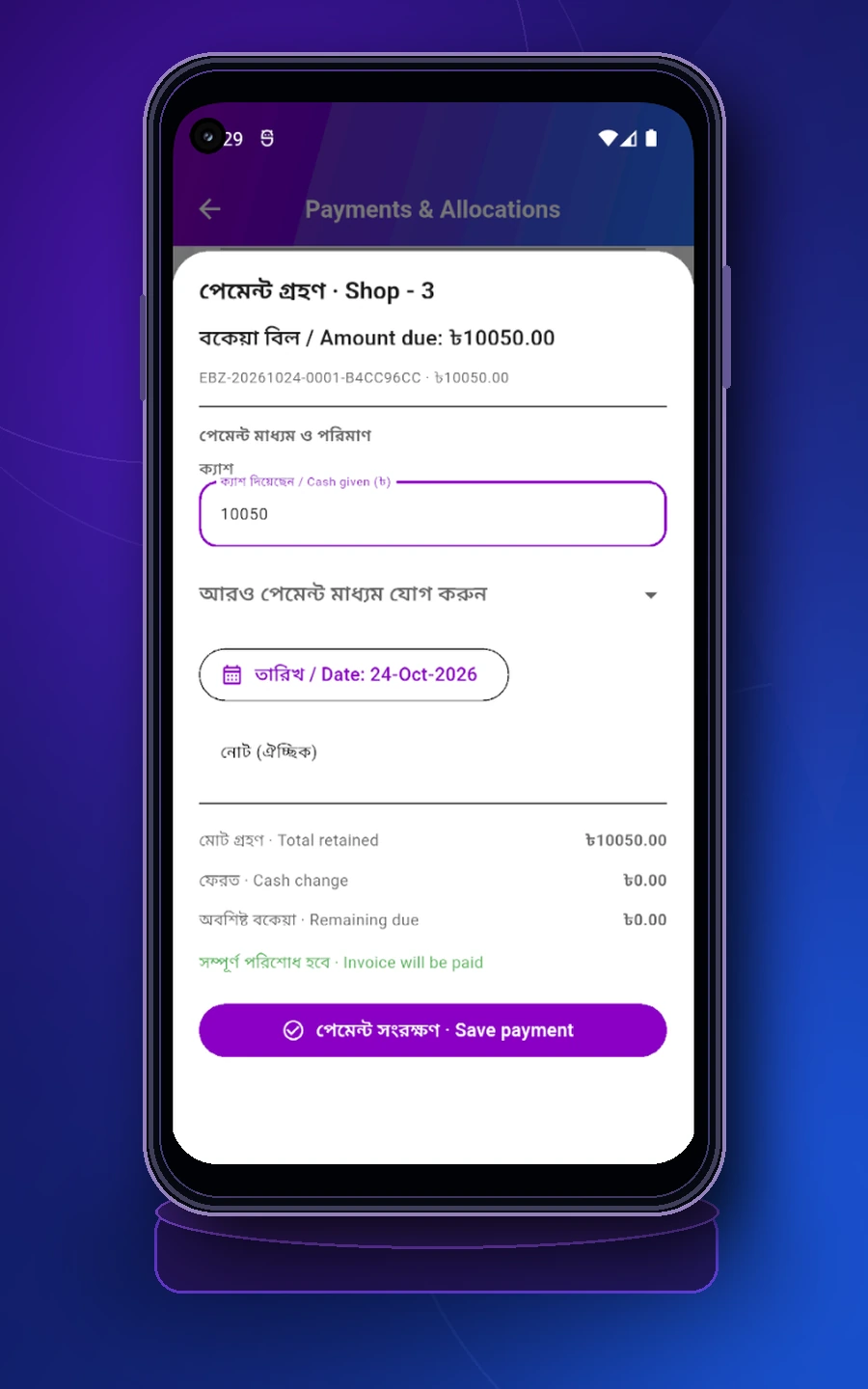
When the received amount matches the due, the invoice is fully paid.প্রাপ্ত অর্থ due-এর সমান হলে invoice সম্পূর্ণ পরিশোধ হয়।
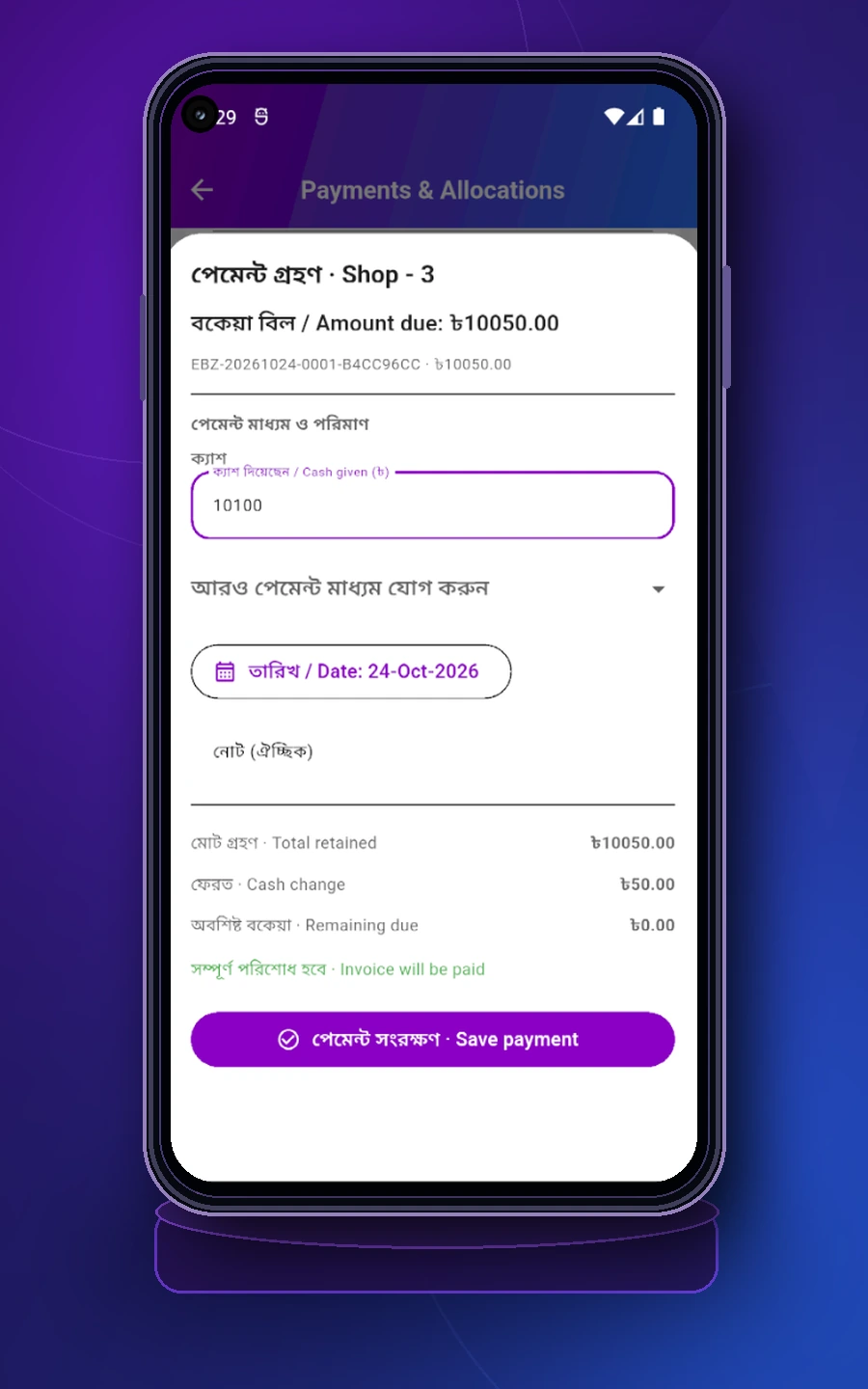
If the tenant gives extra cash, the app shows the cash change instantly.ভাড়াটিয়া বেশি নগদ দিলে অ্যাপ সাথে সাথে ফেরত টাকার পরিমাণ দেখায়।
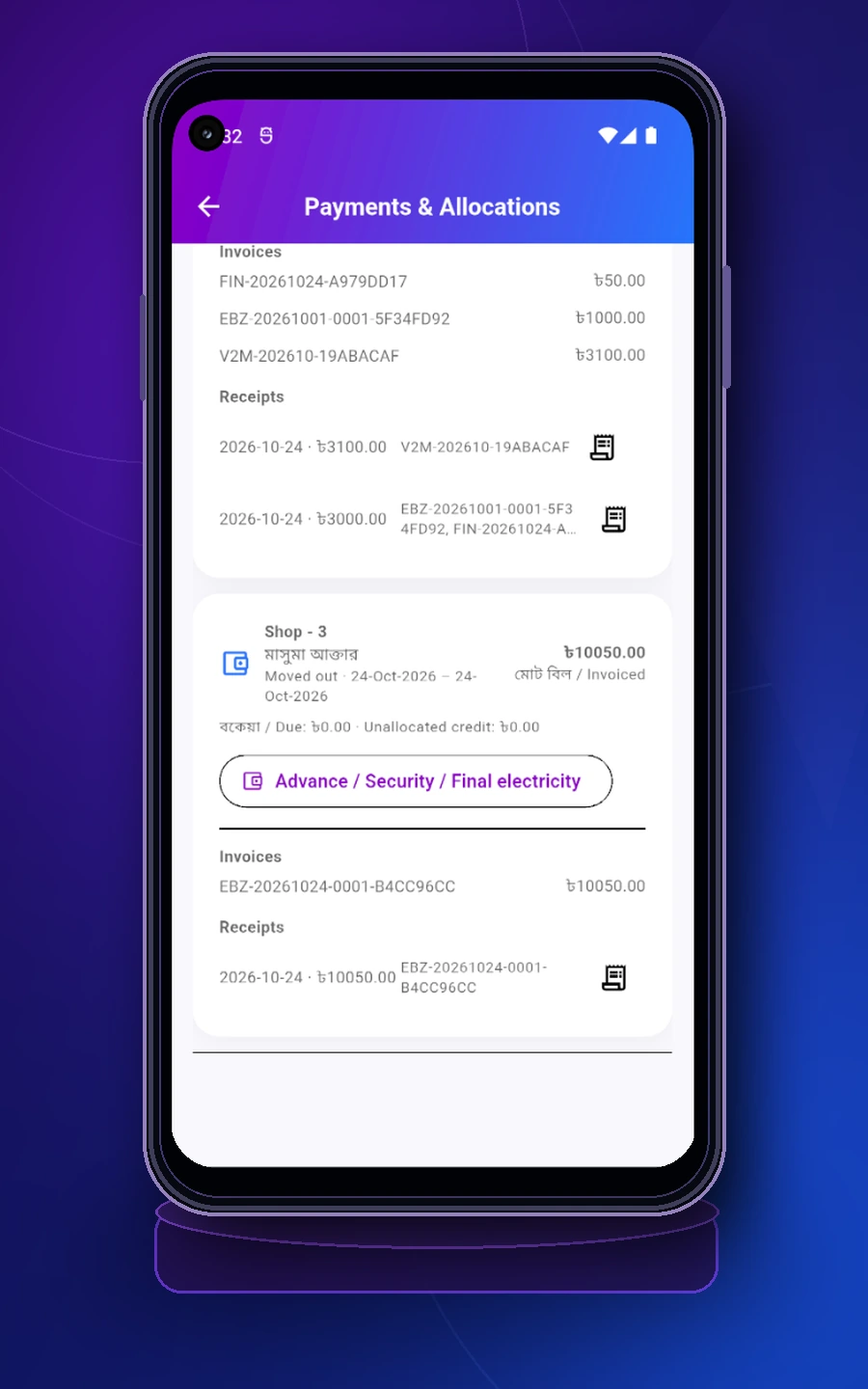
See invoices, receipts and quick access to advance / security / final electricity.এখানে invoice, receipt এবং advance / security / final electricity-তে যাওয়ার shortcut পাওয়া যায়।
Advance and refundable security deposit are separate balances, not normal bill payments. Keep them separate so your books remain transparent and final settlement becomes easier.Advance এবং refundable security deposit সাধারণ bill payment-এর মতো নয়। এগুলো আলাদা রাখলে হিসাব স্বচ্ছ থাকে এবং final settlement আরও সহজ হয়।
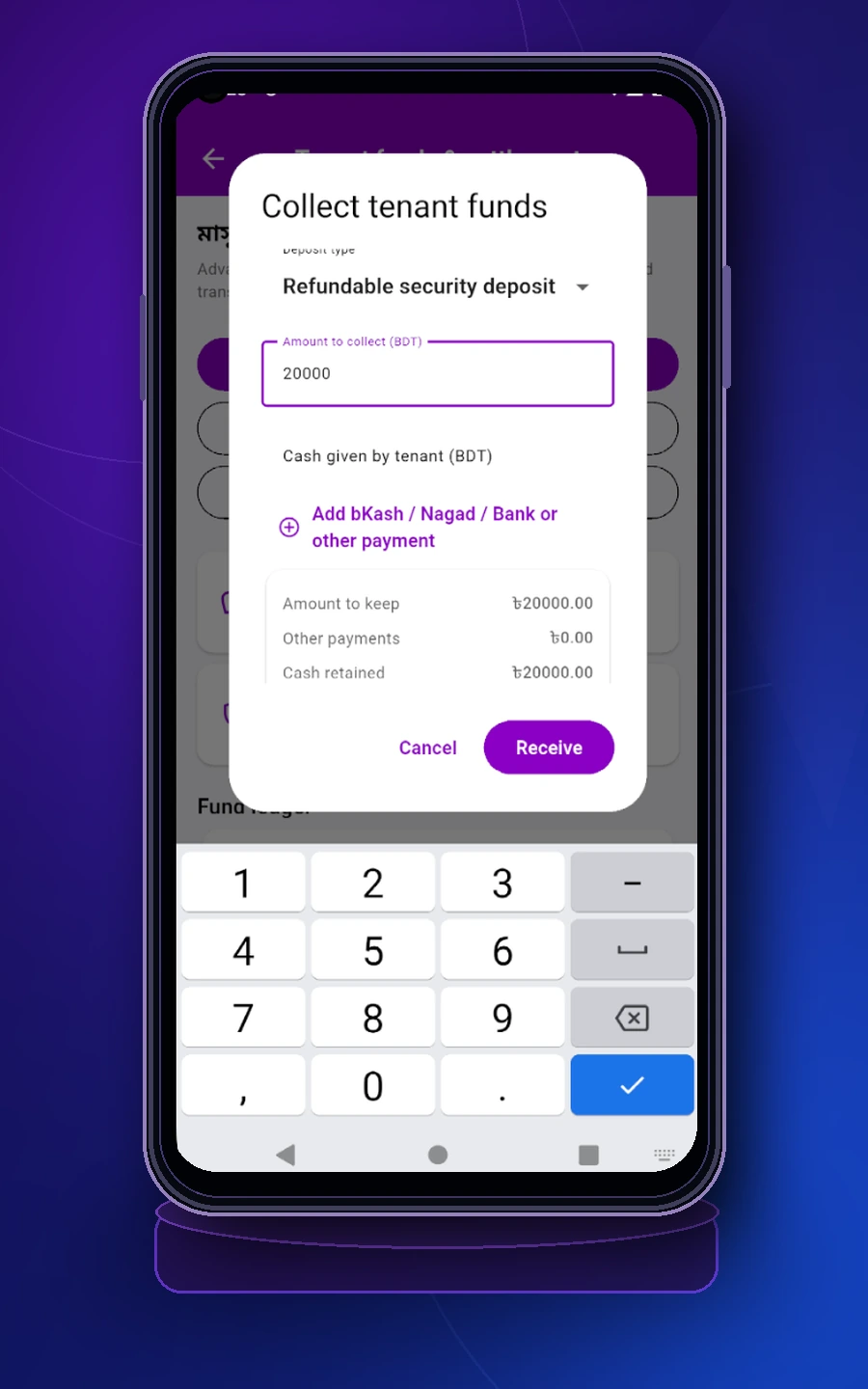
Collect an advance or refundable security deposit with a clear payment breakdown.স্পষ্ট payment breakdown-সহ advance বা refundable security deposit সংগ্রহ করুন।
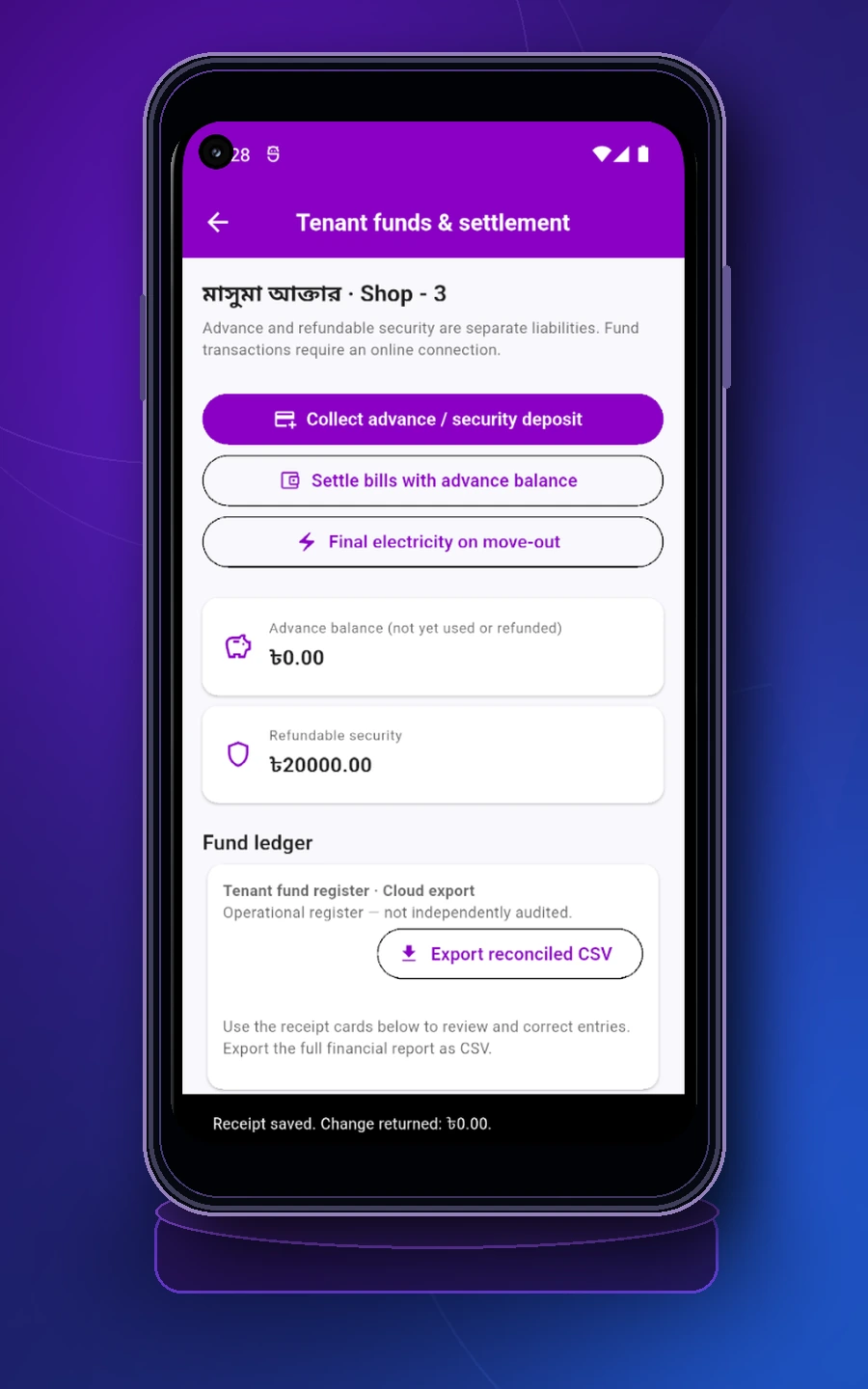
Review current advance balance, refundable security and fund ledger exports.এখানে current advance balance, refundable security এবং fund ledger export দেখা যায়।
When a tenant leaves, mark the tenancy as moved out and synchronize it first. Record the final meter reading to generate a separate linked electricity invoice; existing paid bills remain unchanged. Apply eligible advance to unpaid invoices, and record any actual refund separately.ভাড়াটিয়া চলে গেলে আগে tenancy-কে moved out করে সিঙ্ক করুন। Final meter reading দিয়ে আলাদা linked electricity invoice তৈরি করুন—আগের পরিশোধিত বিল অপরিবর্তিত থাকবে। প্রযোজ্য অগ্রিম বকেয়া বিলে সমন্বয় করুন, আর প্রকৃত ফেরত আলাদাভাবে নথিভুক্ত করুন।
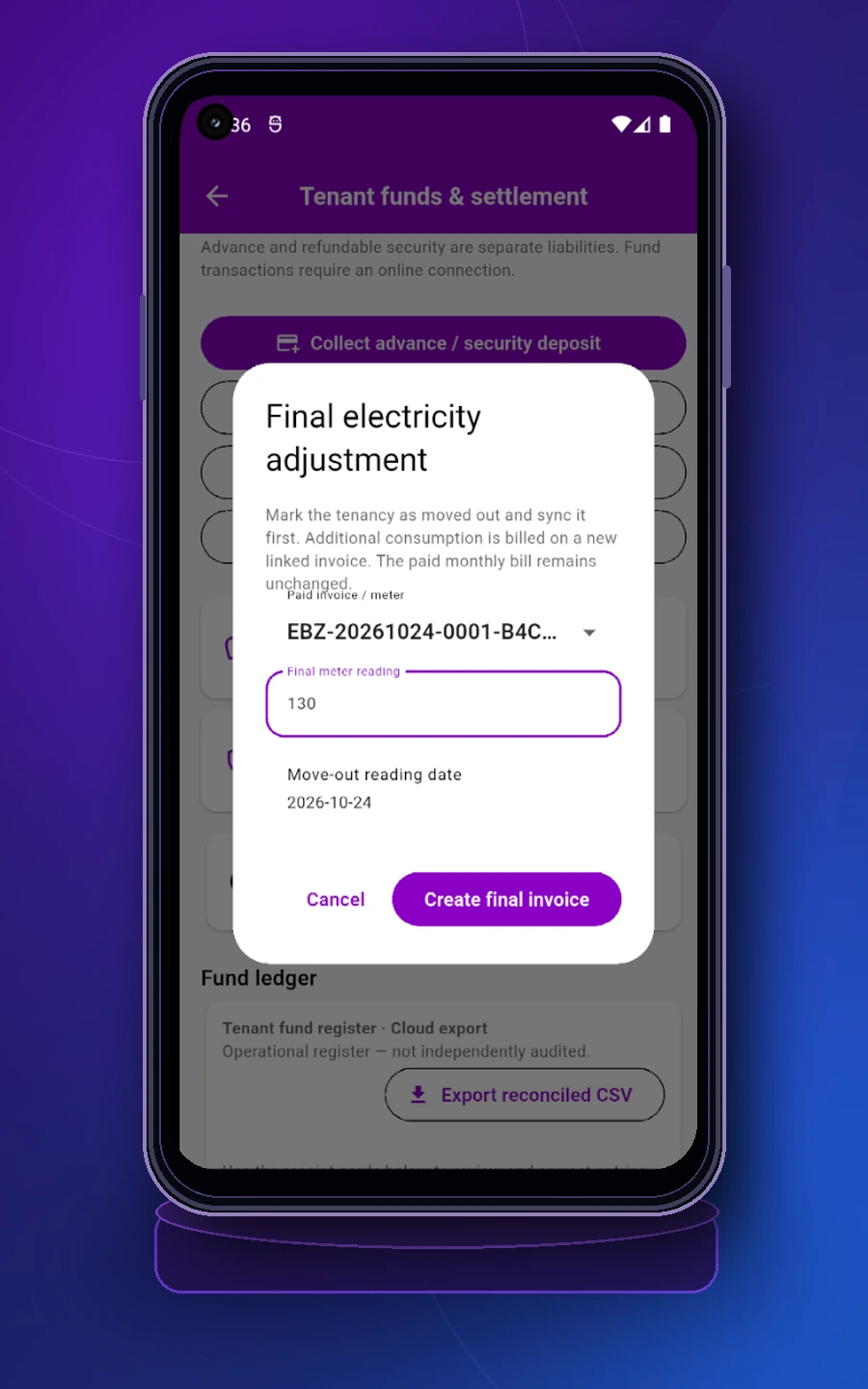
Use the move-out date and final reading to generate the remaining electricity bill.Move-out date এবং final reading ব্যবহার করে বাকি বিদ্যুতের বিল তৈরি করুন।
From the fund page you can collect security, settle with advance balance and continue final settlement.Fund page থেকেই security collect, advance balance দিয়ে settlement এবং final settlement flow এগিয়ে নেওয়া যায়।
After your daily operations, use reports to review billed, received and due figures. You can also publish notices and tenants can sign in to view their own home and billing information.দৈনন্দিন কাজের পরে reports ব্যবহার করে billed, received ও due পর্যালোচনা করুন। প্রয়োজন হলে notice publish করুন, আর tenant তার নিজস্ব home ও billing information দেখতে সাইন ইন করতে পারবেন।
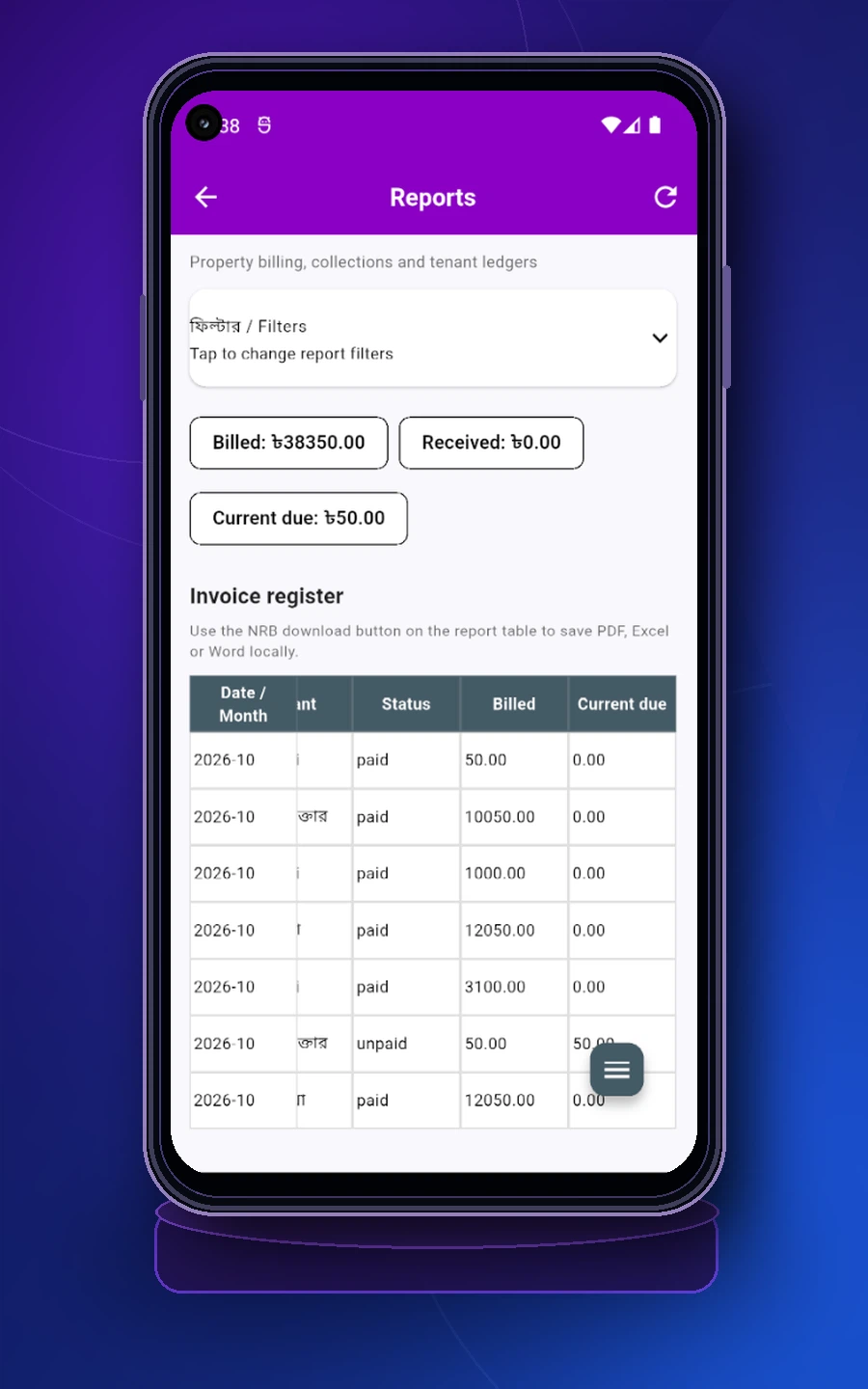
Review invoice register, billed amount, received amount and current due.Invoice register, billed amount, received amount এবং current due পর্যালোচনা করুন।
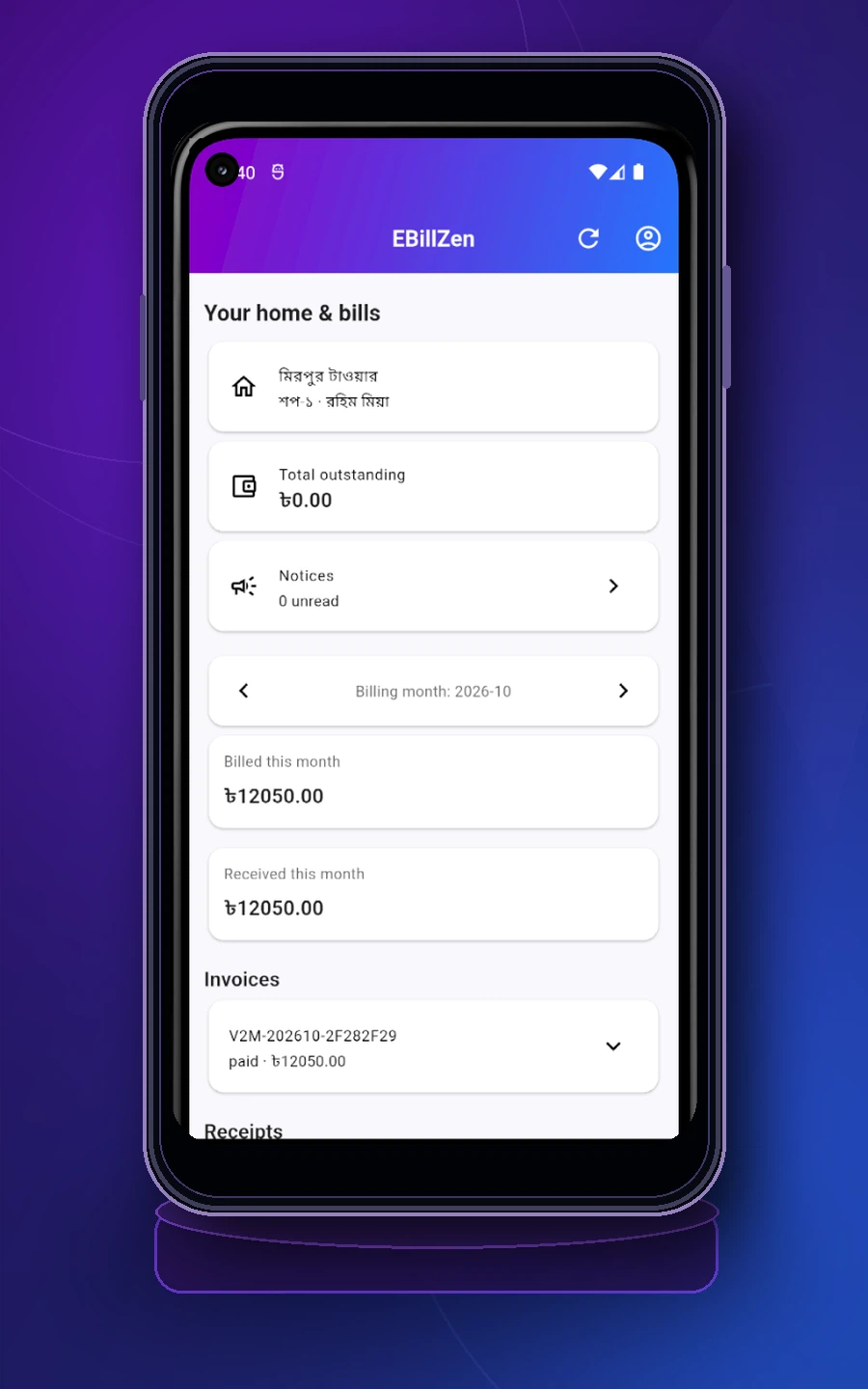
Tenants can review their home, invoices, receipts and unread notices.Tenant তার home, invoice, receipt এবং unread notice দেখতে পারে।
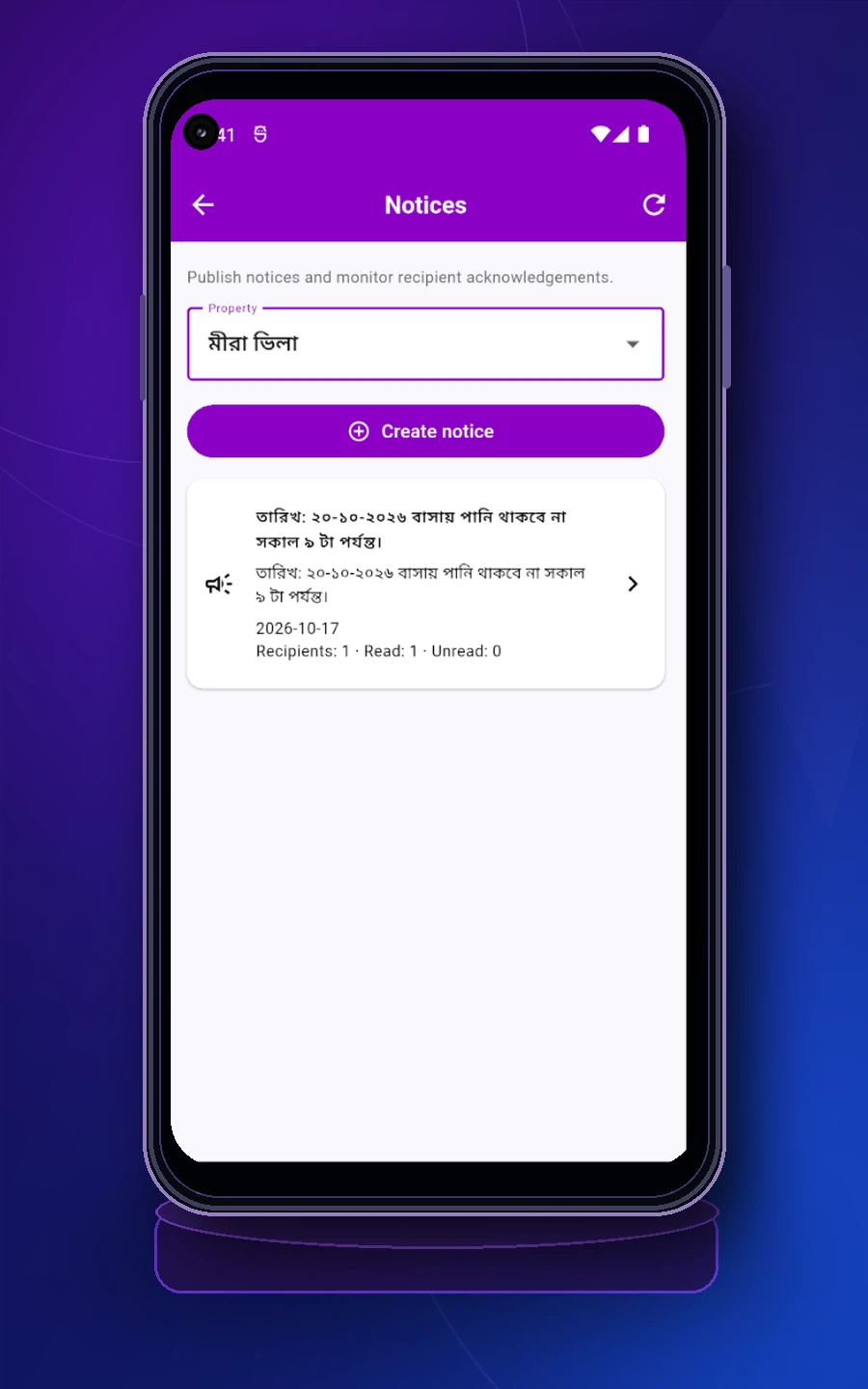
Publish notices and monitor recipient acknowledgement from one place.এক জায়গা থেকে notice publish করুন এবং recipient acknowledgement দেখুন।
These short reminders help keep billing, settlement and reporting transparent for homeowners and tenants.বিল, অগ্রিম ও জামানতের হিসাব যাতে পরিষ্কার থাকে, সে জন্য কয়েকটি বিষয় মনে রাখুন।
A normal bill payment reduces invoice due. An advance stays separate until it is applied to eligible unpaid charges or refunded.বিলের টাকা পরিশোধ করলে বকেয়া কমে। অগ্রিম টাকা আলাদা জমা থাকে; পরে প্রযোজ্য বকেয়া বিলে সমন্বয় বা ফেরত দিলে সেই জমা কমে।
Security deposit should not be mixed with regular bill receipts. Keep it separate so final settlement remains transparent.জামানতের টাকা নিয়মিত বিলের আদায়ের সঙ্গে মেশাবেন না। বাসা ছাড়ার সময় কত টাকা ফেরত দিতে হবে, তা বুঝতে সুবিধা হবে।
If an agreed and legally applicable early move-out penalty applies, issue it as a separate invoice charge—not an automatic deduction from advance or security.চুক্তি ও আইন অনুযায়ী আগে বাসা ছাড়ার কোনো চার্জ প্রযোজ্য হলে সেটি বিলে আলাদা দেখান। অগ্রিম বা জামানত থেকে নিজে থেকে কেটে নেবেন না।
Some edits can be stored locally and synchronized later, but fund and settlement actions require an internet connection. Never share a password or OTP.কিছু তথ্য ইন্টারনেট ছাড়াও রাখা যায় এবং পরে আপলোড হয়। তবে অগ্রিম, জামানত ও চূড়ান্ত হিসাবের কাজ করতে ইন্টারনেট লাগবে। পাসওয়ার্ড বা ওটিপি কাউকে বলবেন না।
You can still use the original meter-only view. There’s no need to set up tenants or monthly rent bills if you only want to track electricity.শুধু বিদ্যুতের হিসাব রাখলে পুরো বাড়িভাড়া বা ভাড়াটিয়া ব্যবস্থাপনা ব্যবহার করার দরকার নেই। আগের মিটার ব্যবস্থাপনার স্ক্রিনেই ফিরে যেতে পারবেন।
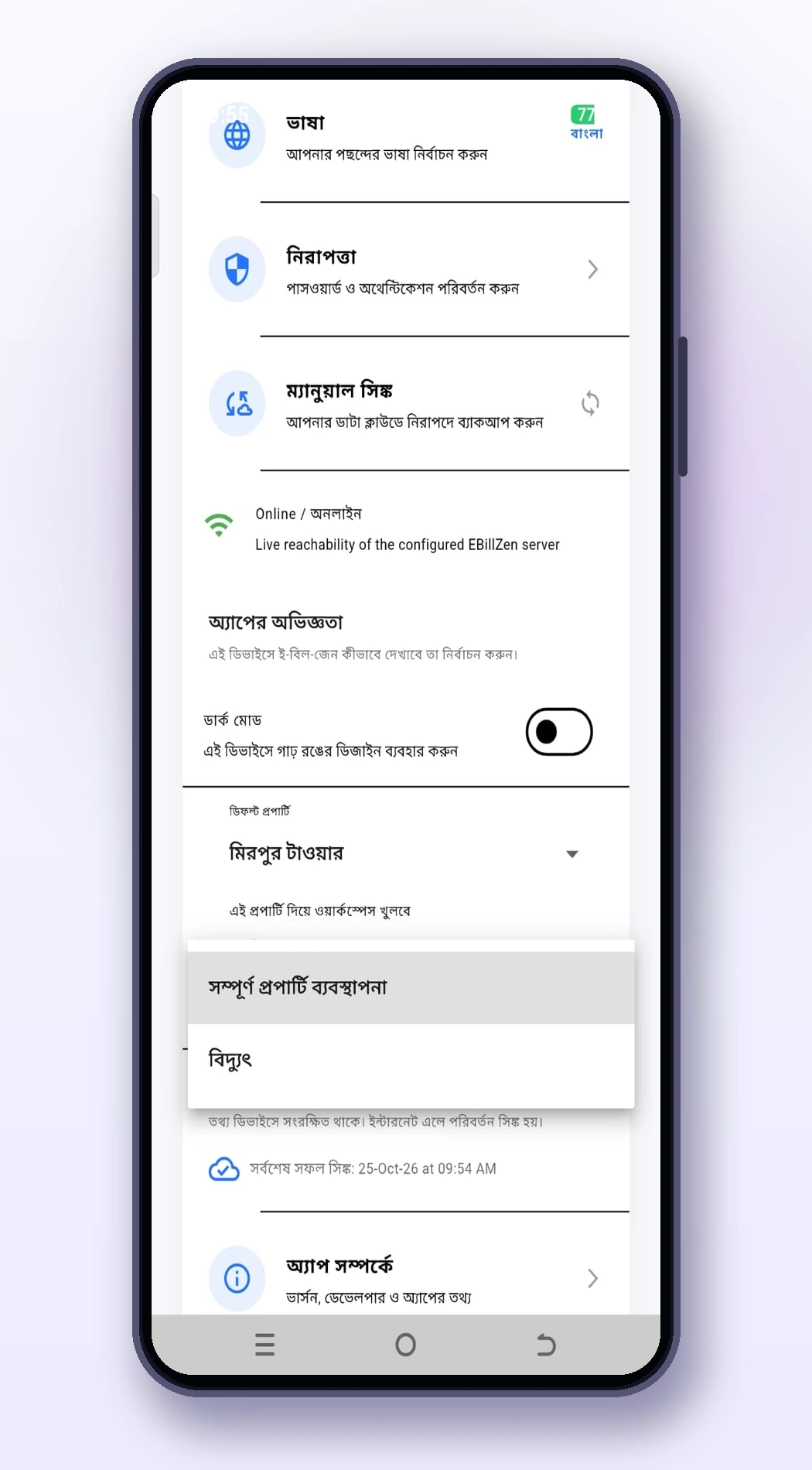
The screenshot shows exactly where the option is.পাশের ছবিতে অপশনটি কোথায় আছে, দেখানো হয়েছে।
Use the mobile app to follow these steps. Keep your app updated for the latest features and corrections. Onboarding, billing workflow অথবা account সংক্রান্ত সহায়তার জন্য আমাদের অফিসিয়াল গুগল প্লেতে ইবিলজেন দেখুনে যোগাযোগ করুন।